Best NFC Cards for Google Reviews: UK Buying Guide
Compare Taproo Google Review standing cards, round cards and stickers with current listed prices. Learn how NFC review links work without guaranteed ratings.
Updated 31 October 2026
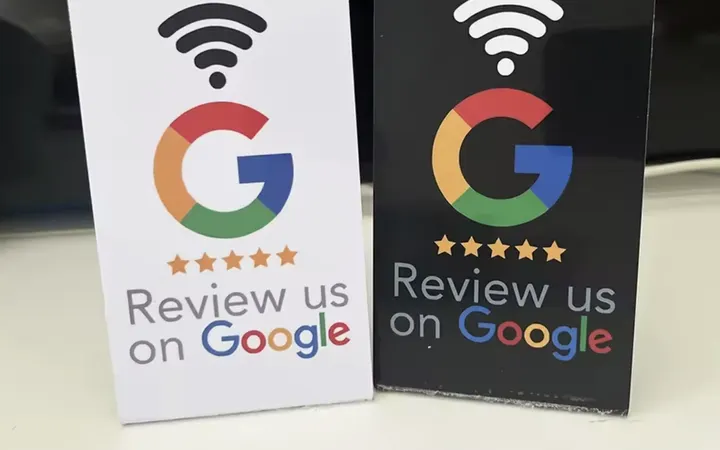
Which NFC card is best for asking customers for Google reviews?
Short answer: Choose a Google Review NFC card based on where customers see it. A standing card works well on a counter, a round card suits compact displays and a sticker fits a fixed surface. Each can help customers open a review link; none guarantees a review or a particular star rating.
Taproo Google Review product options
| Format | Where it fits | Current listed price* |
|---|---|---|
| NFC Google Review Standing Card | Counter, reception desk or table | £12.99 |
| NFC Google Review Round Card | Compact counter or portable display | £9.99 |
| NFC Google Review Sticker | Suitable flat surfaces, packaging or signs | £5.99 |
| Double-Sided Google Review Tap Card | Handheld or countertop sharing | £9.99 |
*Prices were checked against Taproo's active product listings in October 2026. Check the product page for current pricing, availability and options.
How does a Google Review NFC card work?
- Configure the product with the correct Google Business Profile review link or supported Taproo destination.
- Place it where customers can notice it after receiving your service.
- A customer with a compatible NFC phone taps the card. Where a QR code is provided, they can scan instead.
- The link opens the configured destination. Google may require the customer to sign in before posting.
- The customer decides whether to leave a review and what rating to give.
A tap does not automatically submit a review or open a five-star rating. Avoid promising instant five-star ratings or using review gating that selectively directs only happy customers to Google.
Which format should you choose?
Standing card: Choose this for a visible, fixed prompt on a checkout counter or reception desk.
Round card: Choose this for a smaller display or a portable way to share your review link after a service.
Sticker: Choose this for a suitable flat surface where a permanent prompt is useful. Check the surface and chip compatibility before applying it, especially on metal.
Good practice for collecting reviews
Ask customers for honest feedback without offering rewards in exchange for positive ratings. Make the review link accessible to customers regardless of their likely rating. The product makes the link easier to open; service quality and the customer's experience determine whether they leave a review.
Frequently asked questions
Will a Google Review NFC card get me five-star reviews?
No. It makes your review link easier to access. Customers choose whether to review and what rating to leave.
Do customers need a special NFC app?
Most compatible modern phones can open a URL-bearing NFC tag without installing a dedicated NFC app, but behaviour varies by device and settings. A QR fallback can help.
Can I change the destination later?
If your card is configured with a supported editable Taproo destination, you may be able to update the linked page or target without replacing the card. Confirm the product's programming and account requirements.
Which card is best for a small business?
A standing card is convenient at a fixed checkout; a round card is compact; and a sticker suits an appropriate mounting surface. The best choice depends on where you ask for reviews.
Choose a review card for your business
| Customer touchpoint | Useful format | What to check before ordering |
|---|---|---|
| Salon reception or treatment-room checkout | Standing card | Position it where customers can see and reach it after their appointment. |
| Café till or restaurant payment point | Standing or round card | Keep the tap area visible and separate from payment instructions. |
| Small counter or reception surface | Round card or sticker | Check the mounting surface and available space. |
| Mobile service or several customer touchpoints | A card for each location or suitable fixed stickers | Test each item's link against the correct Google Business Profile. |
These are placement examples, not measured review-growth claims.
Physical review cards and hosted review pages are different purchases
You can order Taproo review hardware without creating an account first. The product page explains how to supply your Google review link before programming. A directly programmed Google review URL and an editable Taproo-hosted review page are different configurations.
Taproo's dedicated hosted Google Reviews page type requires Pro. Check current membership allowances if you need hosted-page features; do not assume that buying a physical card includes a paid membership.
How to compare suppliers fairly
Compare the display format, setup process, supported phones, destination control, hardware price, software charges and UK delivery. TAPro's review-card collection and ZappyCards' review card are other suppliers' product information, not independent tests or proof that one supplier generates more reviews.
This guide compares Taproo's own formats using the live catalogue. We have not conducted a controlled review-growth test against those suppliers.
Google guidance and a practical setup check
Google explains how to ask customers for reviews using a link or QR code. Customers need to be signed into a Google Account to post. Use the same invitation consistently and request honest feedback without incentives.
Before displaying a card, open its destination on an iPhone and an Android phone, confirm the business location, and check that the customer can reach the review form. Retest after changing the configured destination.
Next step
Compare Taproo Google Review products and choose the display format that fits your customer experience.
Get started with Taproo
Smart NFC tags and QR codes that point at pages you can edit any time — no reprinting.